Module · Check-in
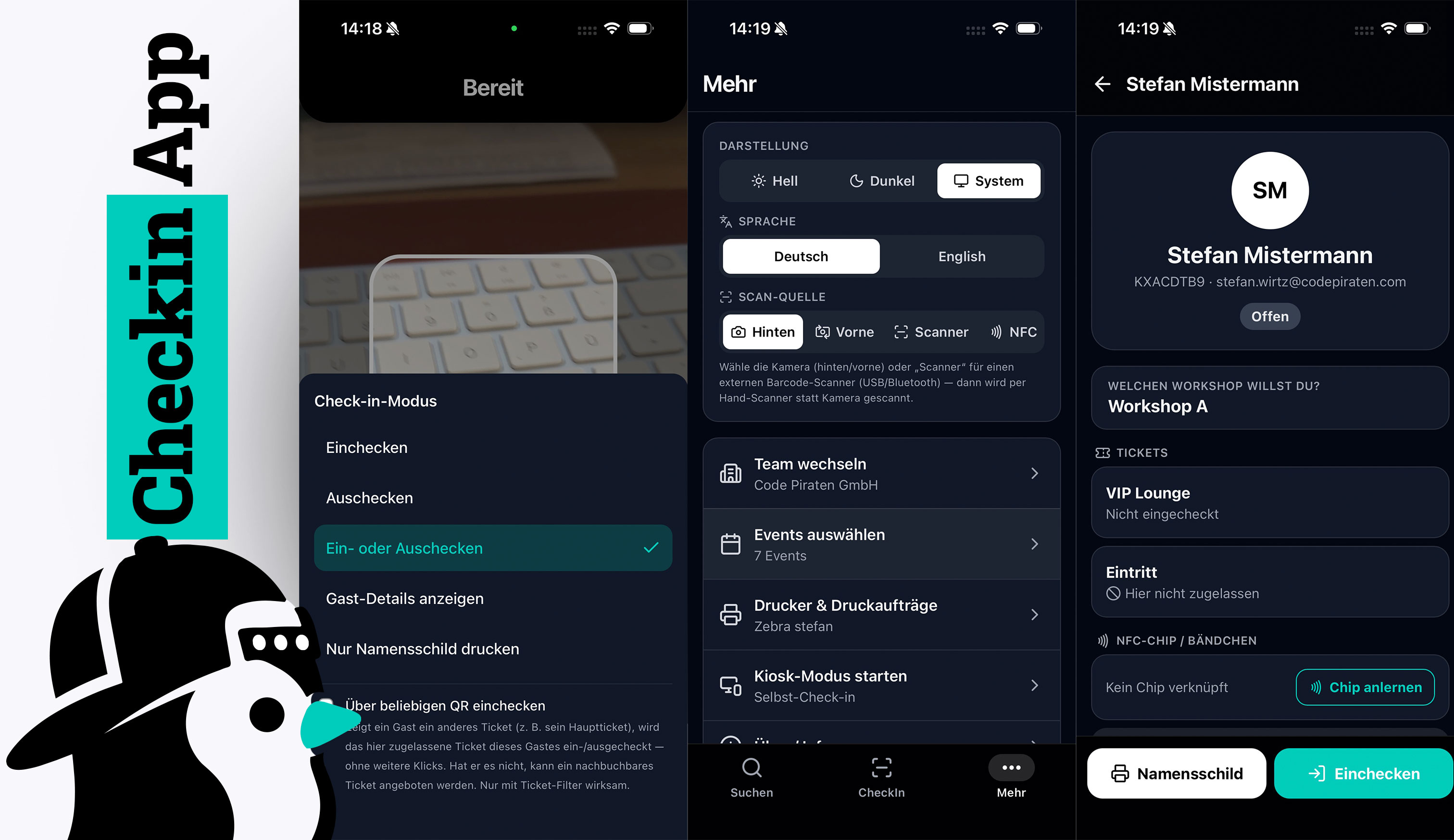
Scan tickets in seconds, safe against double entry — and print the guest’s name badge automatically on check-in.
Fast, safe and with a badge at the push of a button.
Scan tickets with the check-in app — offline-capable and for multiple operators at once.
Every scan runs atomically in a transaction — no re-entry, no double check-in.
Design badges with placeholders, QR and logo — for Brother, Zebra or A4 sheets.
After check-in the single badge is sent to the label printer automatically.
Import tickets from third-party systems and just check them in — ticketYoo as a pure check-in tool.
Assign roles per event: check-in only, guest list or full editing.
A guest wants to switch to another talk or slot on the spot? Rebook right at check-in — flexible for last-minute programme changes.
Define which tickets are valid per check-in station — e.g. VIP only at the VIP entrance or workshop tickets only at the workshop room.
Guests check themselves in at a self-service terminal and print their badge — no queues at the entrance.
Let guests sign right on the device at check-in — e.g. for house rules or photo consent. The signature is stored encrypted with the guest.
Capture specific details right at check-in — e.g. goody bag handed out, cloakroom or photo number, table number or your own fields. Everything lands with the guest instantly.
One code per guest for everything: admission, check-in to individual talks, workshops or catering — and rebooking on site. The guest always has just one ticket (PDF or digital).
Flag guests with priority 1 to 3. The check-in manager sees the level right when scanning — and, if you allow it, may even admit guests from a certain level upwards who never registered at all.
Authorised operators see the event statistics right in the check-in app: check-in status per ticket type and for the whole event — without asking the back office.
Walk-in guests in one go: a full-screen batch form for the front desk with the registration form, ticket selection and the internal check-in fields — optionally checked in right away, marked as paid on site and with a name badge. With companions, duplicate warning and pre-fill from the address book.
Further details and screenshots for this module are coming soon.
One ticket — many stations
Your guest has exactly one ticket — as a PDF or digital. The same code drives as many steps as you like: admission to the summit, check-in to individual talks and workshops, catering or cloakroom — and rebooking further sessions right on site.
Check-in · offline mode
Weak Wi-Fi at the door? No problem. The check-in app preloads a guest snapshot and checks guests in and out even without a connection. As soon as the network is back, it syncs every action automatically with the live system.
Even without ticketYoo tickets
Selling your tickets through another system? No problem: check-in, badge printing and on-site registration still work. Just import the ticket codes, check your guests in and print badges — no system switch, only what you need.
Selling tickets on Eventbrite?
Simply export your attendee list from Eventbrite and upload the file to ticketYoo. Names, email addresses and the barcodes from the export are recognized automatically and taken over as ticket codes. From then on ticketYoo handles admission: on-site badge printing at the push of a button, check-in via app — and, if you like, the guest app for your attendees. Ticket sales stay where they are.
Registrations on Luma?
Export your guest list from Luma and import it into ticketYoo. Your guests get a ticketYoo ticket, you print name badges on site, check them in via app and offer them the guest app. Luma also provides an API — through it, ticketYoo can also sync guests and ticket codes directly if you wish, no file needed.
Eventbrite and Luma are trademarks of their respective owners. ticketYoo is a separate, independent product and has no partnership, cooperation or other business relationship with these providers. Data is exchanged solely via the data you export yourself or via publicly documented interfaces.

Frederik · Training & support
The first check-in day matters most. Before your event we walk through the flow together — scanners, badge printers and the offline mode in case the Wi-Fi at the entrance gets shaky. Just reach out and I’ll set it up with you.